













Buyer Guides
BOM Optimization: Reduce Component Costs for Assembly
Jun
I’ve seen it happen too many times: the Gerber is fine, the placement file is usable, the PCB spec doesn’t scare anyone, and then the assembly quote jumps because three boring line items quietly wreck the budget. One connector. One MCU. One relay. That’s enough.
Here’s the ugly truth: BOM optimization isn’t a “purchasing trick.” It’s where engineering, sourcing, SMT, QA, and real production math crash into each other.
And yes, sometimes the BOM is the problem.
BOM Optimization Is Not Just “Find Cheaper Parts”
BOM optimization means reviewing the bill of materials before PCB assembly to reduce unnecessary component cost, sourcing risk, lead time pressure, and assembly trouble while keeping electrical performance, footprint compatibility, reliability, and customer approval under control.
Sounds neat. It isn’t.
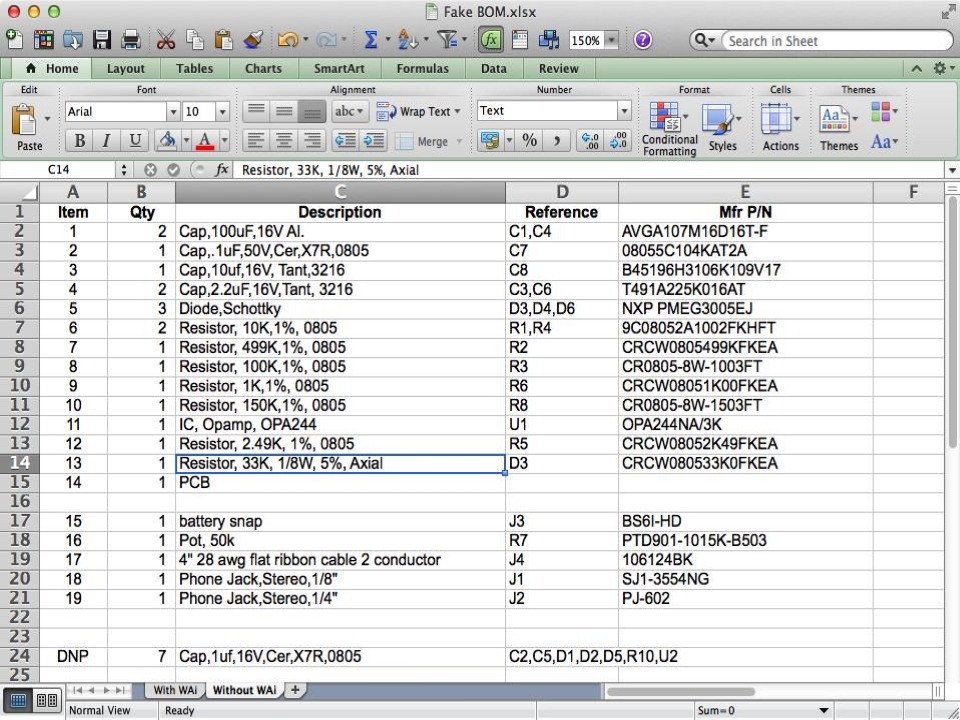
A BOM is not a shopping list. It’s a risk file. Every MPN tells us something: whether the part is easy to buy, whether it’s locked to one distributor, whether it fits the footprint, whether it needs hand soldering, whether it has alternates, whether the factory will hate it during SMT.
Tiny parts hurt.
A 10k resistor usually won’t destroy your cost structure. But a rare connector, an obsolete MCU, a transformer with awkward MOQ, or a relay with only one approved brand can make the whole PCBA quote look unreasonable.
For power products, this is even more obvious. In an OEM power supply PCB assembly with relays and transformer, the cost is not just “relay price.” It is contact rating, coil voltage, insulation distance, transformer sourcing, soldering heat, test method, and failure risk. Save $0.20 in the wrong place and you may buy yourself a field failure.
Bad trade.
The Parts That Usually Inflate PCB Assembly Cost
People blame the factory first. Sometimes fair. Often lazy.
From my experience, the BOM cost usually gets ugly in these areas:
| Cost Driver | Why It Gets Expensive | What To Check |
|---|---|---|
| Connectors | Brand lock, plating, pitch, mating part, MOQ | Can another approved brand fit the same footprint? |
| ICs / MCUs | Lifecycle risk, firmware dependency, allocation | Is it active, programmable, and multi-source? |
| Relays / transformers | Certification, current rating, custom spec | Is the rating real or over-specified? |
| Crystals / oscillators | Load capacitance, ppm, package mismatch | Does the alternate match the circuit? |
| MLCCs | Voltage derating, dielectric, package shortage | Is X7R really needed everywhere? |
| Through-hole parts | Extra labor, wave/selective solder, rework | Can any part move to SMT? |
| Mechanical parts | Manual assembly, tolerance issues | Is the BOM hiding labor cost? |
This is why BOM cost reduction can’t be done by sorting Excel from highest price to lowest price. That helps, sure. But it’s not enough.
The factory needs to know which parts are fixed, which are flexible, and which parts are “ask before touching.” Otherwise everyone wastes time pretending every line item has the same risk.
It doesn’t.
The Real Audit: What I Would Check First
When I review a BOM, I don’t start by begging suppliers for lower prices. I look for weak points.
Wrong package? Stop.
Missing MPN? Stop.
“Capacitor 10uF 25V 0805” with no dielectric, tolerance, height, or brand? Also stop.
Because if the BOM data is vague, the quote becomes a guess. And guesses become arguments later.
| BOM Field | Why It Matters | Risk If Missing |
|---|---|---|
| Full MPN | Confirms exact component | Wrong part purchased |
| Reference designator | Links BOM to placement | SMT confusion |
| Package | Confirms footprint match | Pad mismatch or tombstone |
| Value / tolerance | Supports alternative review | Wrong electrical behavior |
| Voltage / current rating | Prevents under-spec choices | Reliability risk |
| Lifecycle status | Flags obsolete or NRND parts | Production delay |
| Approved alternates | Gives sourcing flexibility | Price and lead time pressure |
| Substitution note | Shows what can be changed | Customer approval conflict |
I frankly believe every serious BOM should have two versions: the engineering BOM and the production BOM.
The engineering BOM says what the designer intended. The production BOM says what can actually be sourced, mounted, inspected, tested, and repeated without chaos.
That second BOM is where money gets saved.
Where Engineers Accidentally Waste Money
Engineers like safety margin. I get it.
Nobody gets blamed for using a stronger part, a tighter tolerance, a famous brand, or an automotive-grade component. But the BOM pays for that comfort. Again and again.
A 0.1% resistor where 1% is fine. A premium Japanese capacitor in a non-sensitive decoupling position. A connector with plating far above the mating-cycle need. A high-temperature part used because it was copied from an old design, not because the product actually runs hot.
This is not incompetence. It’s habit.
But habit is expensive.
In a custom PCB control board assembly with SD slot, we may care about ESD, connector quality, solder reliability, and stable memory access. Good. Spend there. But don’t pretend every passive component needs a premium brand if the circuit doesn’t justify it.
BOM optimization is basically this: know where to protect the design, and know where you’re just burning money.
Component Alternatives: Useful, Dangerous, Often Misused
“Can we use an equivalent?”
That question sounds simple until the part is a crystal, MOSFET, relay, optocoupler, connector, sensor, RF module, or MCU. Then it gets messy.
A good alternative matches the electrical spec, package, footprint, thermal behavior, supplier traceability, lifecycle, and test impact. A bad alternative only matches the headline value.
Same value doesn’t mean same part.
For a custom multilayer PCB assembly OEM supplier service, I’d rather see approved alternates listed early than watch purchasing panic after the design is already frozen. Give me the AVL. Give me the no-substitution list. Give me the parts where price flexibility is allowed.
Then we can work.
| Part Type | Substitution Risk | Comment |
|---|---|---|
| Pull-up resistor | Low | Same value, package, tolerance normally works |
| Decoupling capacitor | Low to medium | Check voltage, dielectric, size, DC bias |
| Connector | Medium to high | Pitch, height, locking, mating part matter |
| Crystal | High | Load capacitance, ESR, ppm must match |
| Relay | High | Contact rating, coil voltage, certification matter |
| MCU | Very high | Firmware, pinout, programming, supply chain all matter |
Here’s the rule I use: if a part can change the test result, the firmware behavior, the safety margin, or the mechanical fit, don’t swap it casually.
Prototype BOM vs Production BOM
Prototype BOM optimization and mass-production BOM optimization are different jobs.
For prototypes, speed wins. If buying from Mouser or DigiKey costs more but gets the first 20 pieces built quickly, fine. Prove the circuit first. Find the layout mistake. Check the firmware. See whether the connector actually fits the enclosure.
Then optimize.
For batch production, the question changes. Can we build 500, 2,000, or 10,000 pcs without price shock? Can we buy reels instead of cut tape? Can we reduce hand soldering? Can we avoid MOQ waste? Can we approve second-source parts before the first shortage email arrives?
In an OEM turnkey PCB assembly service for SMT PCB prototypes, I wouldn’t over-polish the BOM too early. That’s fake efficiency. But after prototype validation, before pilot run, that’s the right window.
Miss that window and the cost gets baked into the design.
The Assembly Floor Sees What Excel Hides
Excel says “component cost.”
The line sees reels, trays, polarity marks, feeder setup, nozzle choice, stencil openings, reflow behavior, AOI visibility, selective soldering, ICT access, and rework pain.
That’s why PCB assembly cost reduction is not only about component price. If one part is cheap but needs hand soldering, special inspection, or slow manual alignment, the BOM saving may be fake.
In an OEM high TG mainboard PCB assembly with large copper areas, thermal behavior matters. Large copper pours pull heat. Power parts may need a different reflow profile. A cheaper component that doesn’t tolerate the process isn’t a saving. It’s a future complaint.
And rigid-flex is even less forgiving.
For an OEM rigid-flex PCB assembly with round board manufacturer, a “compatible” connector may still be too tall, too stiff, or badly placed near a bend area. The BOM can’t be reviewed separately from the mechanical design. Not if you want the product to survive.
How To Reduce BOM Cost Without Making the Product Worse
Don’t start with “please reduce price.”
Start with the BOM.
- Mark fixed parts first. MCU, safety parts, RF parts, programmed ICs, certified relays, key connectors.
- Find the top cost drivers. Usually 10–20% of line items carry most of the cost.
- Check lifecycle status. Active, NRND, obsolete, allocation risk.
- Look for over-spec parts. Tolerance, temperature, voltage, brand, plating, package.
- Approve alternates before sourcing. Not during crisis.
- Reduce manual assembly where possible. Hand work is quiet cost.
- Connect BOM review with DFM. Pad, stencil, thermal relief, AOI, test points—all of it.
Simple list. Hard discipline.
For mobile or compact electronics, like an OEM wholesale mobile phone motherboard PCBA turnkey assembly, the BOM review also needs to respect package density, component height, fine-pitch assembly, and inspection limits. Small does not mean cheap. Often the opposite.
What Buyers Should Ask Before Approving a Cheaper Part
Ask these questions. Quickly. No theater.
| Question | Why It Matters |
|---|---|
| Is the footprint exactly compatible? | Prevents placement and solder defects |
| Is the electrical rating equal or better? | Avoids functional failure |
| Is the supplier traceable? | Reduces counterfeit risk |
| Is the part active in production? | Avoids future shortage |
| Does it affect firmware or testing? | Prevents hidden debug cost |
| Does the customer need to approve it? | Avoids responsibility fights |
| Is the saving meaningful at real quantity? | Stops pointless debate |
That last one matters more than people admit. I have seen teams spend days discussing a replacement that saves less than lunch money on the whole batch.
That’s not BOM optimization. That’s spreadsheet performance art.
FAQ
What is BOM optimization in PCB assembly?
BOM optimization in PCB assembly is the process of reviewing the bill of materials to reduce component cost, sourcing risk, lead time pressure, and assembly problems while keeping electrical function, footprint compatibility, reliability requirements, and customer approval rules under control.
In real work, it means checking MPN accuracy, lifecycle status, package match, approved alternatives, MOQ, assembly method, and testing impact before the project moves into production.
How can I reduce BOM cost without affecting quality?
You can reduce BOM cost without hurting quality by separating fixed and flexible parts, approving equivalent alternatives, removing unnecessary over-specification, consolidating packages, checking lifecycle status, and reviewing sourcing options before purchasing starts.
The safest savings usually come from passive parts, connectors, packaging choices, and non-critical over-specified components. MCUs, relays, safety parts, RF parts, and timing devices need stricter review.
What BOM information should I provide for assembly quotation?
For assembly quotation, you should provide a complete BOM with reference designators, quantities, full manufacturer part numbers, package sizes, values, tolerances, voltage or current ratings, approved brands, and clear substitution notes.
You should also send Gerber files, pick-and-place files, assembly drawings, testing requirements, target quantity, and any fixed component rules. Clean data makes the quote faster and less risky.
When should BOM optimization be done?
BOM optimization should usually be done after prototype validation and before pilot production, because the circuit is stable enough to review but still flexible enough to improve before larger purchasing and assembly decisions are locked.
For prototypes, speed may matter more than price. For production, repeatability, sourcing stability, and real batch cost matter more.
Are cheaper component alternatives safe?
Cheaper component alternatives are safe only when they match the required electrical specifications, package, footprint, temperature range, lifecycle status, supplier traceability, testing needs, and customer approval process.
A resistor alternate may be easy. A relay, crystal, connector, MOSFET, optocoupler, or MCU alternate may need engineering approval before purchasing touches it.
Why does my PCBA quote change after BOM review?
Your PCBA quote may change after BOM review because real component stock, MOQ, packaging type, approved sourcing channel, lead time, assembly method, and testing requirements can change the true production cost.
A quote based on an incomplete BOM is only an estimate. Once the factory checks real availability and assembly difficulty, the cost may move.
Conclusion
If your assembly cost looks too high, don’t only ask the factory to “do better price.”
Send the BOM for review.
We can check cost drivers, sourcing risk, component alternatives, SMT assembly impact, and production feasibility before your project moves into batch production. For a faster review, send Gerber files, BOM, pick-and-place file, quantity, and fixed component requirements.
